Guide
Hire a video editor or use AI? What each costs and when each wins
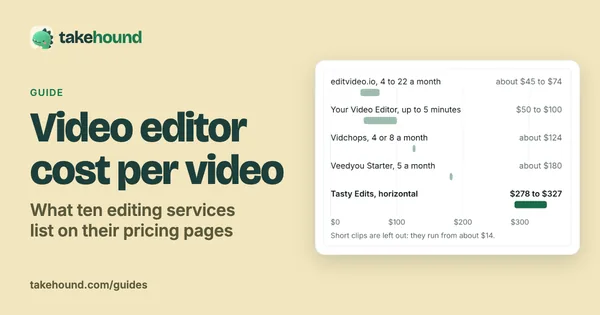
Hire an editor if you want a finished video handed back, with colour, sound and graphics done, on a schedule: the services read for this page work out to about $45 to $327 for one long-form video. Use an AI editor if your slow step is the first cut of a long talk and you are willing to check it and finish it, yourself or with your editor: you pay by the minute of recording instead of by the video, and the finish stays with a person. Many people who sell on camera do both, an AI first pass and a human finish.
I'm Kyle. I built Takehound, an AI editor, so I have a stake in this question. I did not hire the services named here: each price is from the business's own page, read 2026-11-09 and linked beside it.
- $45 to $327for one long-form video, at the services read 2026-11-09
- 9:41for one press of an AI first pass on a 7:23 talk
- 83.5%of judgments preferred a professional's edit in a 2026 benchmark
What an editor costs
Four services and two marketplace guides, as their own pages listed them on 2026-11-09.
Scroll sideways to see every column.
| Who | Price listed | Per long-form video | Worth knowing |
|---|---|---|---|
| Vidchops | $495 a month for 4 long-form videos; $995 for up to 8 | $123.75 at 4 a month | 1 to 2 days turnaround, 3 revisions a video on the $495 plan, royalty-free stock audio and video listed. Its questions cap the finished video at 15 minutes in one answer and 20 in another. |
| Tasty Edits | $327 for one horizontal video, $305 each in a pack of 4, $278 each in a pack of 8 | $278 to $327 | A thumbnail or a vertical version is $43 more each. Unlimited stock footage is listed in every package. |
| editvideo.io for coaches | $295 a month for 4 long-form videos, $495 for 10, $995 for 22, each marked a limited-time offer | $73.75 at 4 a month, $49.50 at 10, about $45 at 22 | A free test edit, a 14-day money-back guarantee, and premium stock footage listed in its long-form plans. |
| Upwork rate guide | Median hourly rates: $10 entry, $40 mid tier, $100 senior | Depends on the hours | Hourly or fixed price; revisions are whatever you agree up front. |
| VidRush's comparison | A freelancer: about $100 to $300 for an 8 to 15 minute edit | $100 to $300 | Its own conversion from Upwork's mid-tier rate, labelled as such, not a quoted price. VidRush sells editing software. |
The per-video figure is the listed price divided by the videos it buys, at the count shown. Plans and limits change.
Coaches often pay by the month instead. Increditors' guide for coaches puts editing at $500 to $1,200 a month for a coach making $0 to $5K a month, and $1,500 to $3,500 at $5K to $20K, read 2026-11-09. Increditors sells those retainers, so read it as a seller's range. More services, plan by plan: video editor cost per video.
What an AI editor does today, and what it does not
An AI editor does the grunt work of a first cut. What it hands back is a draft for a person to check, not a judgement that the video is ready.
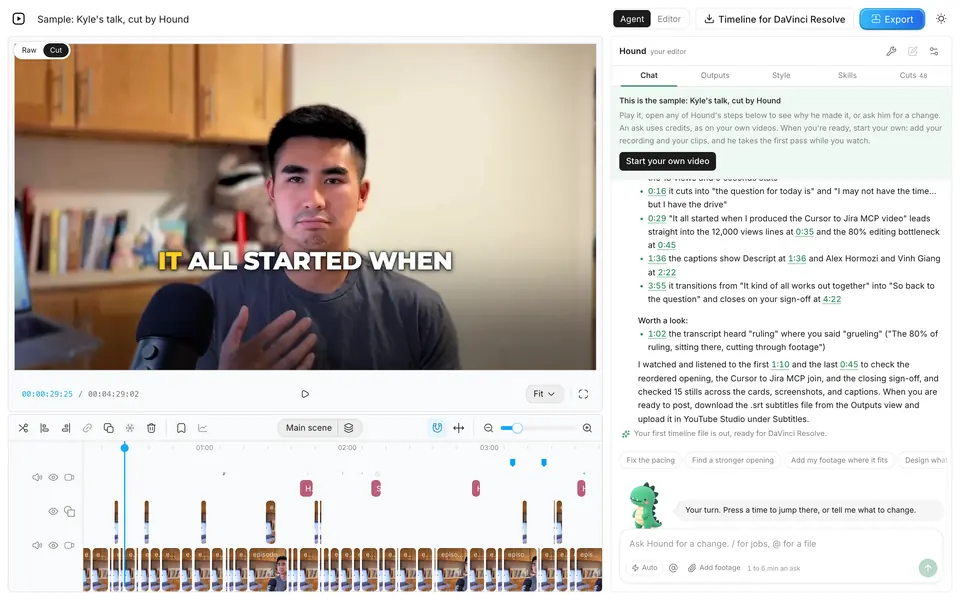
- A timed run. On 2026-10-23, one press of Takehound's first pass, with its review, took 9:41 on a 7:23 talk of mine and cut it to 6:15. One ask in plain words took 5:19 more and left a 5:32 cut. Its review listed five fixes to make by hand. The run was driven by an AI assistant as part of a test of the site; how long it takes to edit a YouTube video has each step.
- A published talk. My own talk went from 12:14 raw to 8:32 published.
- Craft. In a 2026 benchmark of 56 editing jobs, 43 video editors preferred the professional reference edit 83.5% of the time and an AI agent's edit 11.1%, in 2,582 judgments (the paper, read 2026-11-03). An agent can follow the brief and still miss the craft.
So the honest split today: the AI takes the hours of cutting and placing, and a person brings taste to the last part. On Takehound that last part is yours in the browser, or your editor's in DaVinci Resolve.
How to choose
- Hire if you publish every week and an hour of yours is worth more than the fee, if you want a finished video handed back, or if the video needs motion graphics, multicam or a colour grade by a professional. For many experts that is the right answer.
- Use AI if the first cut of a long talk is what keeps you from publishing, if you would check the result anyway, or if you want the cut in your hands the same day instead of in a queue.
- Do both if you already pay an editor: an AI first pass becomes a rough cut your editor finishes. How to brief a video editor has what to send.
- Ask about stock either way. Three of the services above list stock footage in their plans, and five of six AI tools in this comparison for coaches list stock or AI-made B-roll. If you want only your own footage on screen, say so in the brief, or pick a tool that works that way: AI B-roll from your own footage compares tools that place clips you filmed.
What Takehound costs, beside an editor
Takehound charges credits by the minute of recording, so one video's cost depends on its length. These words come from its pricing card when the page is served.
- To start. 4,350 free credits once, no card.
- By the month. $50, $100 and $250 a month. 6,250 to 37,500 credits a month, 125 to 150 credits for each dollar. Unused credits roll over and stay after you cancel.
- What it uses. A first pass uses 90 credits a minute of recording, so a 15-minute talk with two rounds of notes uses about 1,550 credits. Exports, timelines and editing by hand are free.
What it does not give you: a finished video from someone else's hands. The cut is yours to check and finish.
The tool I built
Where Takehound fits
Takehound is mine, so weigh this part. It is the AI route above: a personal editor in your browser that does the first cut of a long talk, for people whose videos earn them money and who would rather not manage an editor for that part.
Takehound is an AI video editor in Chrome on a laptop or desktop, for long talk-to-camera videos. Its agent is Hound, and on a talk he watches and listens to the cut. One press makes a first pass on your recording: he cuts long pauses, filler words and repeated takes, places your own footage on the lines it fits, and puts key lines on screen, with a reason for each change. The button says how long it should take before you press it.
B-roll is only your own footage, never stock or generated, and a line none of it fits stays on you as a gap instead of getting a wrong clip. A book, product or site you name may go up as a reference, with its source, marked as not cleared for you: he may add one without being asked, and you take it off or carry the rights yourself. Steer him in plain words, and he learns how you cut. Then export an MP4, or a timeline (FCPXML) that imports into DaVinci Resolve, where its clips then need relinking to your footage. It does not export to Premiere, and the file has not been opened in Final Cut.
Sign in with Google for a free first video, up to 30 minutes. See privacy.
For coachesSources
Every outside fact on this page, with the day it was read. None of the services was hired for this page.
- Vidchops: pricing page and its questions, read 2026-11-09.
- Tasty Edits: pricing page, read 2026-11-09.
- editvideo.io: video editing service for coaches, read 2026-11-09.
- Upwork: how much hiring a video editor costs, read 2026-11-09.
- VidRush: YouTube video editing services, what each costs per video, read 2026-11-09.
- Increditors: video editing for coaches and course creators, 2026 guide, read 2026-11-09.
- The editing benchmark: the paper on arXiv, read 2026-11-03; AI editing agent for video says more about it.
- Takehound's runs: my own notes from the days given, and its price from its pricing card when the page is served.
Questions
How much should a coach pay a video editor per video?
On the pages read 2026-11-09, a long-form video is $123.75 at Vidchops on its 4-video plan and $278 to $327 at Tasty Edits, and editvideo.io's long-form coach plans work out to $73.75 a video at $295 a month for 4, down to about $45 at $995 for 22. VidRush estimates a freelancer at about $100 to $300 for an 8 to 15 minute edit, from Upwork's mid-tier median of $40 an hour. More plans: video editor cost per video.
Is AI video editing good enough to replace an editor?
Not for the whole job yet. In a 2026 benchmark, 43 video editors preferred a professional's edit 83.5% of the time and an AI agent's 11.1% (read 2026-11-03). An AI editor is good at the first cut: on 2026-10-23, Takehound's first pass cut a 7:23 talk of mine to 6:15 in 9:41, and its review listed five fixes left for a person.
Do video editing services use stock footage?
Some list it in their plans: Vidchops lists royalty-free stock audio and video, Tasty Edits lists unlimited stock footage in every package, and editvideo.io lists premium stock footage, all read 2026-11-09. If you want only your own footage on screen, say so in your brief.
Can I use an AI editor and a human editor together?
Yes. An AI first pass can hand your editor a rough cut: Takehound exports a timeline that opens in DaVinci Resolve, with the reason for each change on it. It does not export to Premiere, and Final Cut has not opened one. How to brief a video editor has a template.
More guides
- AI video editor for coaches: six tools and where their B-roll comes from
Descript, OpusClip, Jupitrr AI, Captions, Submagic and Takehound: what each does, its price, and where its B-roll comes from.

- AI video editors that export to DaVinci Resolve, compared
Five tools that hand a timeline to Resolve: the file, the plan it needs, your media, the B-roll it adds and the price.
- Video editor cost per video: what 10 editing services list
Seven of ten editing services have a per-video figure, from about $14 for a short clip to $327. Every plan, caps and extras.