Roundup
AI B-roll from your own footage: the tools and what each hands back
These nine tools work with clips you filmed: RawCut, ClipMatch, SceneRoll, Eddie AI, Selects, Jumper, FireCut, Vizard Agent and Descript. Below is what each takes, what it hands back and who it fits, plus the one I built. I wrote this because on 2026-10-03 a search for “AI B-roll from my own footage” returned a first page of stock and generated B-roll tools.
I'm Kyle. I built one of these tools, so I have a stake, and the part about mine is marked. I have not used the other nine. They are not every tool that works with your own clips, only the nine I compared. Each fact about them comes from the vendor's own pages, read 2026-10-04, and the links are under each tool.
Side by side
What each one takes and hands back
Scroll the table sideways to see all six columns.
| Tool | You get back | How it uses your own clips | You give it | When nothing fits | Price |
|---|---|---|---|---|---|
| RawCut | A finished vertical video. No timeline file is mentioned. | Only clips you filmed. No stock, nothing generated. | iPhone clips, plus one line for a theme or one line per scene. | The line is left out, and the app tells you which one. | Free with a small RawCut watermark on the video: two videos, then one a week. Pro is monthly. The App Store listing shows $6.99 and no billing period. |
| ClipMatch | A finished vertical video. No timeline file is mentioned. | One of your uploads for each line, from three ranked options with a match score. | Uploaded clips and photos, plus a script, line by line. | Its FAQ says the line is flagged so you can pick another clip, change the line or upload more footage. A clip with a low score is also marked for you to check. | Its home page says the first 3 exports are free, no card. Then $14.99 a month for 5 exports, or $49.99 for 20. |
| SceneRoll | A finished vertical video. No timeline file is mentioned. | Picks from a free stock library and from your uploaded clips, side by side. | A voice memo, or an uploaded vertical video or audio file. | Not stated. | 5 trial credits, no card. Billed annually: $171 a year for 50 credits a month, or $351 for 150. A credit is a minute of exported video. Monthly billing costs more. |
| Eddie AI | A timeline for Premiere, DaVinci Resolve or Final Cut. Avid support is in beta, with a waitlist. | Your footage first, then stock, then a generated clip. It asks before generating. | Your talking-head footage and your B-roll files. You ask for B-roll in chat. | If a stock search finds no good match, it says so and offers to generate the shot. After a pass it gives a rough share of the video covered and points out the picks it doubts. | Credits, no subscription. Packs from $10 for 1,000. A new account gets 1,000 credits free. |
| Selects by Cutback | A project file for Premiere, Final Cut or DaVinci Resolve. | Your footage only. Its help page says no stock library is built in. | Raw footage, with an optional pasted script. You ask for cutaways in chat or drag clips in. | Not stated. You can ask chat for a different shot before anything is added. | Starter $20 a month, Pro $100 a month, less when billed annually. Free trial. |
| Jumper | A timeline for Premiere, Final Cut, DaVinci Resolve or Avid. | The agent searches your footage by what is visible and what is said. | Footage analyzed on your own computer, plus a prompt typed into an AI agent app you run. | Not stated. | Jumper is $169 one-time. The agent feature is in Jumper Pro: $49 a month, $399 a year or $599 one-time. Prices are per seat, and one-time licenses include a year of updates. Free trial. |
| FireCut | B-roll on the open timeline. No file to export. | You add a folder as a Personal library, and FireCut scans and tags the clips so it can use them. Find B-roll on the Resolve Pro plan also searches that library. | A timeline with your main video, open in DaVinci Resolve or Premiere. | Not stated. | B-roll starts on the Pro plans: $20.99 a month in Resolve, $34 in Premiere, less when billed yearly. 7 day trial. |
| Vizard Agent | A finished video. | On request: you upload clips and tell it to prefer them. It also uses stock, the open web and generated shots. | A video of you talking, and a typed prompt asking it to keep your video and voice. Your own clips are optional. | Stock is found for the lines your clips do not cover. | Its online editor page calls it free to use. Run costs are given in credits, and I found no dollar price for the Agent on the pages I read. |
| Descript | A video you finish in Descript. On some plans, a timeline for Premiere, DaVinci Resolve or Final Cut. | By hand: you drag your clips onto the script or the timeline. Descript says Underlord, its AI co-editor in beta, can look in your Media library, in stock, or generate a clip. | A recording. You edit the video through its transcript. | Not stated. | Free plan. Hobbyist $24 a month, Creator $35 a month, less when billed annually. |
| Takehound mine | A B-roll timeline (FCPXML) for DaVinci Resolve or Final Cut. Not Premiere. Not a finished video. | Only your footage. One of your shots for each line it can, with a one-line reason. | A pasted script and a folder of footage you filmed, in a desktop browser. | No shot is placed. The line stays on you, the speaker. | Free, invite-only beta. No card. |
“Not stated” means I did not find it on the vendor's pages on 2026-10-04, not that the tool can't do it. Prices are as listed that day. The links are under each tool below.
Group 1
Tools that hand back a finished short video
All three make vertical videos for TikTok, Reels and Shorts. None of their pages mentions a timeline file for an editor.
-
iPhone app
RawCut
- Good to know
- It matches each line to the seconds inside a clip where it happens. With a line left out, the video can come out shorter than the length you picked.
- Who it is for
- People who post short vertical videos from an iPhone. Its site says it is iPhone only, with no Android version yet.
- Better than mine
- It finishes the job on the phone that holds the footage, with no computer and no editing app. It also matches a line to what is said inside a clip.
RawCut's home page, script guide, support page, pricing page and App Store listing, read 2026-10-04.
-
On its website
ClipMatch
- Good to know
- Its pages mention no stock or generated source, though none says in words that stock is never used.
- Who it is for
- Creators who make videos for brands (UGC), and small businesses, that already have footage and want short vertical videos.
- Better than mine
- The video comes back finished, with captions and voiceover included in the price. You see three options and a score for each line, where Takehound shows one pick and its reason.
ClipMatch's home page, script to video page, AI video editor page, pricing page and FAQ, read 2026-10-04.
-
Web app, phone or desktop
SceneRoll
Turns a voice memo into a vertical video: it transcribes the recording, splits it into scenes and picks B-roll for each.
- Good to know
- The B-roll comes from a free stock library (Pexels) and from your Vault of uploaded clips. Its page does not say stock can be switched off.
- Who it is for
- Creators, entrepreneurs and small business owners. Its about page adds people who would rather not be on camera.
- Better than mine
- It starts from your voice. You record a memo in a phone browser and get a finished video, with no script to write and no editor to open.
SceneRoll's home page, which holds its pricing and FAQ, and its about page, read 2026-10-04.
Group 2
Tools that hand back a timeline for an editing app
These three are built for people who edit. Each can hand off to Premiere, which Takehound cannot.
-
Web, Mac, Windows and iPhone
Eddie AI
An assistant editor: you import your footage and your B-roll files, and say in chat where the B-roll should go.
- Good to know
- Your footage comes first, but it is not the only source. Stock is next, and you pick those clips. A generated clip is last, and it asks first.
- Who it is for
- Professional video editors, by its own description. Its home page also names creators and filmmakers.
- Better than mine
- It does the rest of the edit too: a first cut of the talking head, footage from more than one camera, and projects for Premiere as well as Resolve and Final Cut. Avid support is in beta. The two are set side by side in Eddie AI vs Takehound.
Eddie's help pages on adding B-roll, stock B-roll and generated B-roll, its home page and its pricing page, read 2026-10-04.
-
Desktop app, Mac and Windows
Selects by Cutback
Turns raw footage into a first edit. For B-roll you drag a clip in, or describe the cutaways in chat.
- Good to know
- Placement is on request: its help page says the Auto add button was removed, and you now ask in chat. Chat proposes shots first, so you can ask for a different one before anything is placed.
- Who it is for
- Professional editors, by its own description, cutting long recordings shot on more than one camera. On a Mac it needs an Apple Silicon (M-series) chip.
- Better than mine
- It builds the first edit of the main footage as well, lines up footage from more than one camera, matches your footage to a pasted script, and hands off a Premiere project.
Cutback's help pages on adding B-roll, what Selects is and system requirements, and its pricing page, read 2026-10-04.
-
Desktop app and editor plugins, Mac and Windows
Jumper
Searches your footage on your own computer. Its agent feature hands that search to an AI agent app you run yourself, such as Claude Code or Codex, and its docs give matching B-roll to a script as one use.
- Good to know
- Your video files stay put, but the agent is sent file paths, timings, small thumbnail images and pieces of the transcript. If the agent's AI model runs online and not on your computer, those go to that company's servers.
- Who it is for
- Editors and post-production teams who are willing to direct an AI agent with prompts.
- Better than mine
- The analysis runs on your own computer, where Takehound sends small still images out to be described. It also works inside four editors, Premiere and Avid included.
Jumper's home page and agents page, its docs on agentic editing and privacy, and its pricing page, read 2026-10-04.
Group 3
Tools where your own clips are an extra step
These three start from something else: FireCut and Vizard Agent from stock, Descript from editing by hand. Each can use your own clips, but it takes an extra step: adding a folder, saying so in the prompt, or placing clips yourself. SceneRoll and Eddie AI, above, also draw on stock.
-
Plugin for DaVinci Resolve and Premiere
FireCut
Works on a timeline that already holds your main video: it finds Storyblocks stock clips, adds them, and you review and swap.
- Good to know
- FireCut says that if you have footage of your own you want it to use, you add the folder as a Personal library, and it scans and tags the clips. Its pricing page lists searching your own library “with AI recognition” under Find B-roll on the Resolve Pro plan.
- Better than mine
- It works on the timeline you already have open, so there is no file to import, and it covers Premiere.
FireCut's B-roll pages for DaVinci Resolve and Premiere, its Find B-roll documentation and its pricing page, read 2026-10-04.
-
Web app
Vizard Agent
- Good to know
- Its B-roll how-to warns that you may not have the right to publish footage it pulls from the open web. It says to tell it when a video is commercial, and it will keep to licensed sources.
- Who it is for
- Someone who wants a finished video back from a chat prompt, without opening an editor.
- Better than mine
- You fix a single B-roll shot by saying which one is wrong, and it can fill the lines your clips do not cover.
Vizard's how-to pages on adding B-roll to a video of you talking, a shot per sentence and near-miss B-roll, its online editor page and its pricing page, read 2026-10-04.
-
Desktop and web app
Descript
- Good to know
- Its search matches file names and spoken words. Descript says Underlord, its AI co-editor in beta, can look in your Media library. That is from a Descript reply on its feedback board dated 2026-09-25, not from a help page.
- Who it is for
- People who record and edit in Descript itself. The by-hand steps are in Descript B-roll from your own footage.
- Better than mine
- It is a whole editor. You cut the recording by its text, add clips and publish without leaving the app.
Descript's B-roll tool page and download page, its help pages on layers, the Media library, search, Underlord and timeline exports, its feedback board and its pricing page, read 2026-10-04.
Pick by your situation
Which one fits you
- You post short vertical videos from an iPhone and want only your own clips.RawCut
- You have a script and clips to upload, and want a finished vertical video.ClipMatch
- You would rather record a voice memo than write, and stock beside your clips is fine.SceneRoll
- You edit, or work with an editor, and want the talking head cut too.Eddie AI or Selects
- You already direct an AI agent app and want your footage analyzed on your own computer.Jumper
- You already edit in DaVinci Resolve or Premiere, and stock is fine for most shots.FireCut
- You want a finished video from one prompt, and stock or generated shots may fill gaps.Vizard Agent
- You want one app where you cut the words and place clips by hand.Descript
- You are not an editor, you talk to camera from a script, and you want only your own shots, with a reason for each, on a timeline for DaVinci Resolve or Final Cut.Takehound, my own tool
Not sure which kind of tool you need at all? How to choose an AI video editor that works with your own footage sorts them into four kinds and gives five questions to ask.
The tool I built
Where Takehound sits
Takehound is mine, so weigh this part. It belongs in the second group: it hands back a timeline, not a finished video. I'm not an editor, so I built it to do the logging, finding and placing. The story, the taste and the final cut stay with you.
The browser version takes a pasted script and a folder of footage you filmed. It proposes one of your shots for each line it can and gives a one-line reason for each. Where nothing fits, the line stays on you. No stock, nothing generated.
You get a B-roll timeline (an FCPXML file) for DaVinci Resolve or Final Cut, and you lay it over your recording there. Not Premiere, not a finished video, and not on a phone. Cutting from a talking-head recording is the Mac command-line version only.
-
One line of my own 50-second talk · Mac version
“So choosing three things that matter the most to you and then focusing on that”
- File name
- IMG_2652.mov
- Its reason
- “A hiker pausing at a trail sign suggests stopping to choose what matters most.”
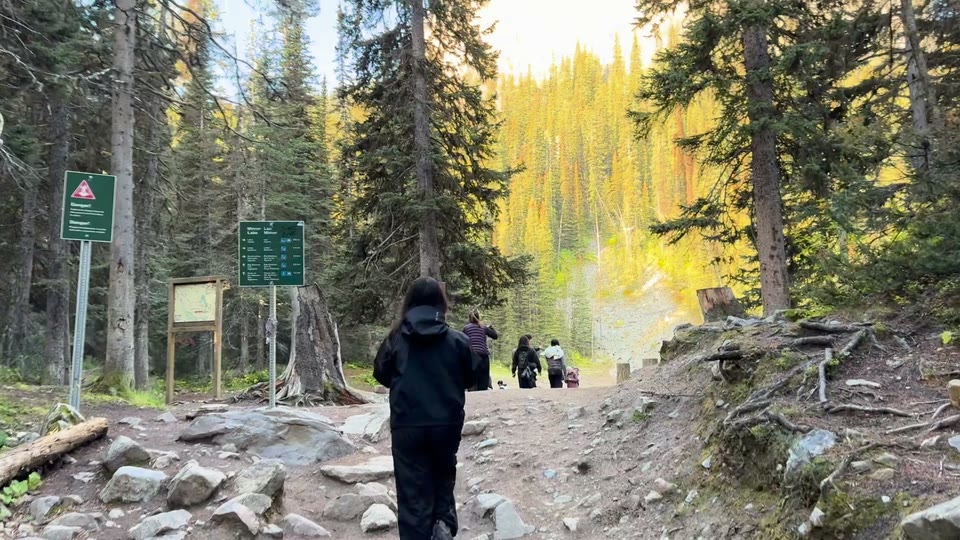
That talk has 7 lines. Takehound proposed a shot for 5 of them and I kept 3. A reason is not proof, so watch each pick. All 7 lines are in B-roll ideas for coaches.
Free, invite-only beta. No card. Your video files stay on your computer, and small still images from your clips are sent to be described. See privacy.
See how Takehound worksQuestions
Which AI B-roll tools use only my own footage, with no stock?
Of the tools on this page, RawCut and Selects say so in words: RawCut says no stock and nothing generated, and Selects says it has no stock library and looks only in your footage. ClipMatch's pages describe only clips you upload and mention no stock. Jumper's pages describe a search of the footage on your own computer and mention no stock either. Takehound, the tool I built, uses only footage you filmed too. (RawCut's home page, Cutback's help page, ClipMatch's home page and Jumper's docs, read 2026-10-04.)
Can AI add my own B-roll to a talking-head video I already recorded?
Yes. Eddie AI and Selects start from the recording and place your B-roll when you ask in chat. Vizard Agent does it from a prompt if you upload your clips and tell it to prefer them. The browser version of Takehound starts from a pasted script instead, and its Mac version from the recording. (Eddie's help page, Cutback's help page and Vizard's how-to, read 2026-10-04.)
Which of these hand back a timeline for DaVinci Resolve, Final Cut or Premiere?
Eddie AI, Selects and Jumper list all three. Descript lists all three on its Creator plan and up. FireCut works inside DaVinci Resolve or Premiere. Takehound exports FCPXML for DaVinci Resolve or Final Cut, not Premiere. (Eddie's pricing page, the Selects pricing page, Jumper's docs, Descript's help page and FireCut's B-roll pages for Resolve and Premiere, read 2026-10-04.)
Which of these tools keep my video files on my own device?
RawCut says your videos stay on the iPhone, and only small still frames and compressed audio are analyzed. Jumper says its analysis runs on your own computer. With Takehound, your video files stay on your computer and small still images are sent to be described. ClipMatch, SceneRoll and Vizard Agent work on clips you upload. (RawCut's support page and Jumper's privacy docs, read 2026-10-04. The others are linked under each tool.)
More guides
- AI video editor with your own footage: how to choose
Four kinds of AI video editor for your own footage, a decision table, and five questions to ask.
- Descript B-roll from your own footage: how to do it
What Descript does with B-roll from your own clips, by-hand steps, a file name pattern, and where Takehound differs.
- How to edit a talking head video with B-roll
When to cut away or stay on the speaker, shown cut by cut on one real 50-second talk.