Comparison
AI video editors for talking-head videos: six compared
Takehound is the one of these six built for B-roll from your own footage only. The other five each do more of something else.
I'm Kyle. I built Takehound, so I have a stake, and I did not test the other five for this page. Each fact about them is from their own pages, read 2026-11-05, linked under Sources. Where one of them is the better pick, the page says so.
The six at a glance
Scroll sideways to see every column.
| Tool | B-roll comes from | A reason for each change | Timeline for | Price, read 2026-11-05 |
|---|---|---|---|---|
| Takehound mine | Only your own footage. Where none of it fits, the line stays on you | Yes, in plain words, in a feed | DaVinci Resolve; Final Cut has not opened one | 4,350 free credits once; plans from $50 a month |
| Descript | Stock (GIPHY, Storyblocks), generated, or yours by hand or through Underlord | Not found; removed retakes stay as text you can restore | Premiere, DaVinci Resolve, Final Cut, on Creator and up | Free plan; from $16 a person a month billed yearly |
| Gling | Stock (Pexels), generated, or a file you upload | Not found; you can inspect and restore cuts | Premiere, DaVinci Resolve, Final Cut, paid, from its desktop app | One free hour a month; from $10 a month billed yearly |
| Visla | Free and premium stock, generated, or your Private Stock | Not found | Not found on its pages | Free plan; from $15 a month billed yearly |
| ChatCut | Generated, or yours when you point at it | Not found; a summary at the end | Premiere, DaVinci Resolve; not Final Cut | Free plan; from $21 a month billed yearly |
| Eddie AI | Yours first, then stock (Pexels, plus Shutterstock with your key), then generated | Not found; it flags picks it was unsure of, and you can ask it why it made a cut | Premiere, DaVinci Resolve, Final Cut, Avid, OTIO | 500 free credits; packs from $10 for 1,000 |
Not found“Not found” means not found on the tool's own pages on 2026-11-05, not that it can't. PricesPrices are in dollars as each pricing page showed them.
Pick by what you need
- B-roll only from your own footage, with a reason for each pickTakehound
- One app to record, edit by transcript and caption, with a teamDescript
- Bad takes and pauses out of a YouTube talk, at a low price per hourGling
- Videos for a business team from scripts, pages or slides, with avatarsVisla
- Editing by prompt, also from a coding agent, with generated shotsChatCut
- An AI editor that video professionals use, with exports to Premiere, Avid and moreEddie AI
What Takehound holds to
- Your own footage, never stock. B-roll is only clips, photos, slides and screen recordings you filmed or made. Nothing is generated, and a line none of it fits stays on you.
- Every pick explained. Each cut and each clip comes with a reason in plain words, so you can overrule it.
- A timeline for DaVinci Resolve. Export an FCPXML timeline and finish in DaVinci Resolve, or an MP4 from the browser. Not Premiere. Final Cut has not opened one.
Where the others win, each comparison says so: Descript, Gling, Visla, ChatCut and Eddie AI (read again 2026-11-08). A video agent for creative teams, set beside Takehound on its own: Mosaic. A low-priced auto-editor with AI and stock B-roll: OpusClip. Other tools place your own clips too: B-roll from your own footage compares nine of them.
Sources
Pricing pages of Descript, Gling, Visla, ChatCut and Eddie AI; on where B-roll comes from, Descript's media panel and Quick Design, Gling's B-roll help, Visla's AI video editor, ChatCut's talking-head docs and shorts docs and Eddie AI's B-roll help; on timelines, Descript's timeline exports, Gling's web or desktop, Visla's exporting, ChatCut's product facts and Eddie AI's exports; and Eddie AI's home page and help on a first edit; Descript's Underlord help. All read 2026-11-05.
The tool I built
Where Takehound fits
Takehound is an AI video editor in Chrome on a laptop or desktop, for long talk-to-camera videos.
What Hound does
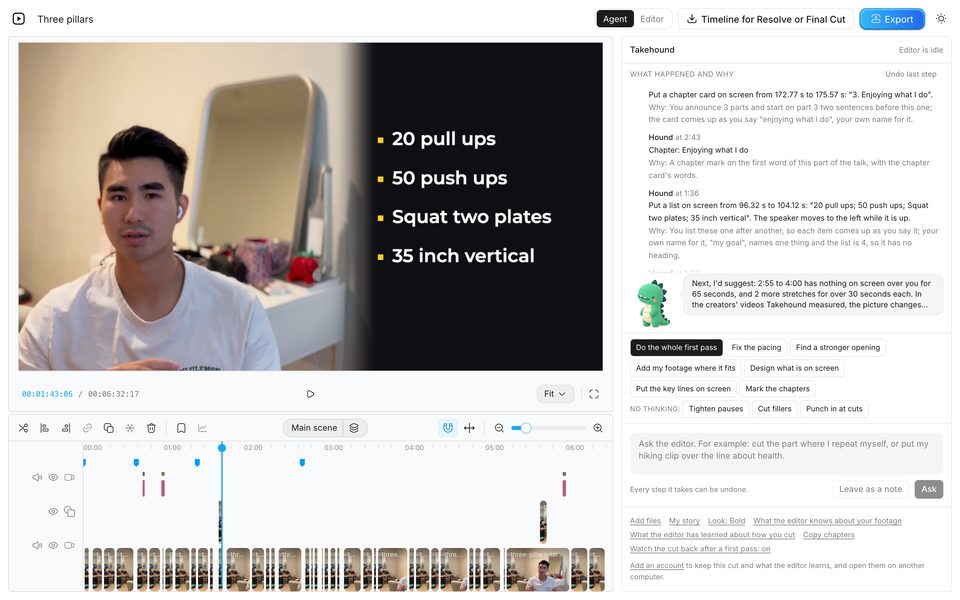
Its agent is Hound, and on a talk he watches and listens to the cut he makes. One press makes a first pass on your recording: he cuts long pauses, filler words and repeated takes, places your own clips where he matches them to what you say, working from written descriptions of stills from each clip, and puts key lines on screen, with a reason for each change. B-roll is only your own footage, and a line none of it fits stays on you. Steer him in plain words, and he writes down how you cut for your next video. Then export an MP4, or a timeline (FCPXML) for DaVinci Resolve.
4,350 free credits once, no card. See privacy.
See how Takehound worksQuestions
Which AI video editor uses only my own footage for B-roll?
Of these six, Takehound: its B-roll is only footage you filmed, never stock or generated, and a line none of it fits stays on you. Eddie AI uses your footage first, then stock, then a generated clip. Descript, Gling, Visla and ChatCut can use your own clips too, beside stock or generated ones. (Each tool's own pages, read 2026-11-05, linked under Sources.)
What is a good Descript alternative for talking-head videos?
For a long talk you recorded, with your own B-roll: Takehound. For bad takes cut at a low price: Gling. For editing by prompt with generated shots: ChatCut. Descript stays the pick for recording, podcasts and teams. (Read 2026-11-05.)
Which of these export to DaVinci Resolve or Final Cut?
Descript (Creator and up), Gling (on a paid plan, from its desktop app) and Eddie AI export to both. ChatCut exports to DaVinci Resolve and Premiere, not Final Cut. A timeline export was not found on Visla's pages. Takehound's timeline opens in DaVinci Resolve; Final Cut has not opened one, and it does not export to Premiere. (Read 2026-11-05.)
How much does Takehound cost?
4,350 free credits once, no card, enough for a first video of up to 30 minutes, then plans from $50 a month for 6,250 credits. A first pass uses 90 credits a minute of recording, so a 15-minute talk with two rounds of notes uses about 1,550 credits.
More guides
- Descript alternative with B-roll from your own footage
Descript records and edits by transcript, with stock and generated B-roll. Row by row, with dated prices.
- Gling alternative for talking heads with your own B-roll
Gling cuts bad takes and silences for YouTube at a low price. Row by row, with dated prices.
- AI B-roll from your own footage: which tools use your clips
Nine tools that work with clips you filmed, plus mine: what each hands back, the price, and a link to each vendor's own pages.