Comparison
OpusClip vs Takehound: auto-edit, B-roll and price
Pick OpusClip to turn a raw talking video into a finished video and a set of clips at a low price, with stock or AI B-roll. Pick Takehound if you sell what you know on camera and want B-roll only from your own footage, with a reason for each change.
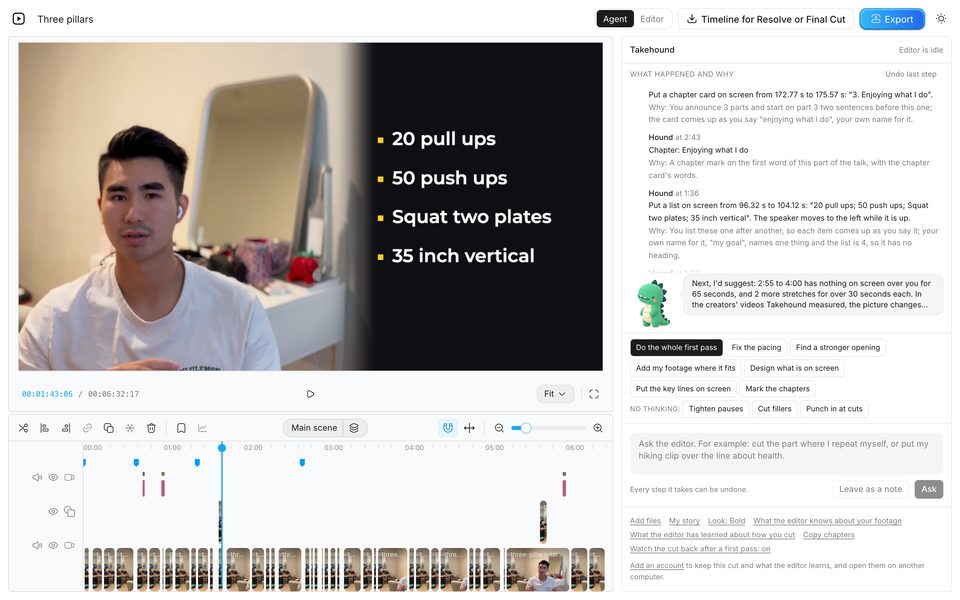
I'm Kyle. I built Takehound, so I have a stake. I did not test OpusClip for this page. Each fact about it is from OpusClip's own pages, read 2026-11-08, linked under Sources.
Side by side
Scroll sideways to see every column.
| Topic | OpusClip | Takehound mine |
|---|---|---|
| Built for | Founders and operators who make video, in its own words: "a founder recording a two-minute product update on their phone", or "a dentist answering patient FAQs on camera every week". Clipping long videos into short ones is still its best-known job. | People who talk to camera in long videos and are not editors: coaches, consultants and experts who sell on camera, and their talks and lessons. |
| The talking head | Auto-edit, new in OpusClip 4.0: drop in raw footage or a link, switch on speech cleanup, captions, B-roll and more, and a finished video comes back. Pauses and filler words come out on Starter; bad takes on Pro. Recipes save a setup for the next video. | One press cuts long pauses, filler words and repeated takes while you watch. It also takes a room's hum off your voice and grades the picture. |
| B-roll comes from | AI image B-roll and stock B-roll (3 clips a month each on Starter; on Pro, 50 AI images a day and stock without a cap), and AI video B-roll on Pro. Pro can also upload your own media to a library. Matching your own footage to your words: not found on its pages. | Only your own clips, photos, slides and screen recordings. No stock, nothing generated. Where none of it fits, the line stays on you. |
| Reasons | A written reason for each cut or each shot: not found on its pages. | A reason in plain words for each change, in a feed. Not proof, so watch each one, and undo what you don't want. |
| Words on screen | Animated captions, a hook style for the first seconds (Viral Hook), and Motion Graphics that turn what you say into icons, numbers and charts. | Your key lines as titles, lists and tables, and captions over the whole video in one press. Only words you said. |
| You get back | An MP4: a finished video, 60 to 90 second highlight clips, or a 3 to 5 minute cut. On Pro and Business, an export to Premiere Pro and DaVinci Resolve. | An MP4 from the browser, or a timeline (FCPXML) that opens in DaVinci Resolve. Final Cut has not opened one. Not Premiere. |
| Where it runs | In the browser, and from ChatGPT or Claude through its AI Producer plugin. | Chrome on a laptop or desktop. Nothing to install. Not made for a phone. |
| Price | A free plan with a watermark. Starter $15 a month, Pro $29 a month. See Prices. | 4,350 free credits once, no card, enough for a first video of up to 30 minutes. Then plans from $50 a month for 6,250 credits. A first pass uses 90 credits a minute of recording; exports are free. |
Not found on its pages“Not found on its pages” means it was not found on 2026-11-08, not that OpusClip can't do it.
Prices, read 2026-11-08
OpusClip's plans as its pricing page showed them on 2026-11-08, in dollars, and Takehound's as its own pricing page has them today.
OpusClip
Scroll sideways to see every column.
| Plan | A month | What you get, for a talking video |
|---|---|---|
| Free | $0 | Clipping and captions with a watermark; MP4s and uploads kept 3 days |
| Starter | $15 | No watermark, timeline editing, pause and filler removal, 3 AI image and 3 stock B-roll clips a month |
| Pro | $29 | Bad-take removal, AI video B-roll, unlimited stock, your own media library, export to Premiere Pro and DaVinci Resolve |
| Business | Custom | Pro, with a dedicated processing queue and no cap on your media library |
The pricing page lists each plan as a price a month. It was read once; plans and limits change.
Takehound mine
Scroll sideways to see every column.
| Plan | Price | What you get |
|---|---|---|
| Free | 4,350 free credits once, no card | Every feature, and credits for a first pass and your notes on it |
| Monthly plans | $50, $100 and $250 a month | 6,250 to 37,500 credits a month, 125 to 150 credits for each dollar. Unused credits roll over and stay after you cancel |
| What it uses | A first pass uses 90 credits a minute of recording, so a 15-minute talk with two rounds of notes uses about 1,550 credits. Exports, timelines and editing by hand are free | A job that fails on our side uses nothing |
Where OpusClip wins
- Price: Pro is $29 a month. Takehound uses credits for each minute of recording.
- Short clips: it cuts a long video into many short ones, reframes them upright, and scores each for how likely it is to spread.
- Formats from one edit: highlight clips, a 3 to 5 minute cut, or a quick update, plus hooks and motion graphics from its templates.
- A timeline for Premiere Pro, which Takehound does not export.
- Posting and scheduling to social accounts from the same app, and editing from ChatGPT or Claude.
- A free plan, with no card.
Which one to pick
Pick OpusClip if
- You want a finished video and a week of clips from one recording, at a low price.
- Stock or AI-made B-roll is fine for what you sell.
- You finish in Premiere, or post straight to social.
- You make short videos as often as long ones.
Pick Takehound if
- You sell what you know on camera, and you are not an editor.
- You want B-roll only from your own footage, and a gap where none of it fits.
- You want a reason for each change, and an editor that learns how you cut.
- You finish in the browser or DaVinci Resolve, or hand the timeline to your editor.
Weighing more tools? See six AI video editors for talking-head videos, compared. Other tools place your own clips too: B-roll from your own footage compares nine of them.
Sources
OpusClip's OpusClip 4.0 announcement (2 November 2026, by its co-founder and CEO) and its pricing page, read 2026-11-08.
The tool I built
Where Takehound fits
Takehound is an AI video editor in Chrome on a laptop or desktop, for long talk-to-camera videos.
What Hound does
Its agent is Hound, and on a talk he watches and listens to the cut he makes. One press makes a first pass on your recording: he cuts long pauses, filler words and repeated takes, places your own clips where he matches them to what you say, working from written descriptions of stills from each clip, and puts key lines on screen, with a reason for each change. B-roll is only your own footage, and a line none of it fits stays on you. Steer him in plain words, and he writes down how you cut for your next video. Then export an MP4, or a timeline (FCPXML) that opens in DaVinci Resolve.
4,350 free credits once, no card. See privacy.
See how Takehound worksQuestions
Is Takehound an OpusClip alternative?
Yes, if you want B-roll only from your own footage. OpusClip 4.0 auto-edits a raw talking video and fills B-roll with AI images, AI video and stock. Takehound cuts the talk too, takes its B-roll only from clips, photos and screen recordings you filmed, and gives a reason for each change. OpusClip also cuts short clips and exports to Premiere, which Takehound does not. (OpusClip's OpusClip 4.0 announcement and pricing page, read 2026-11-08.)
Does OpusClip use my own footage for B-roll?
On Pro you can upload your own media to a library. The B-roll its plans list is AI images, AI video and stock. Matching your own footage to what you say was not found on its pages. (OpusClip's pricing page, read 2026-11-08.)
Which is cheaper, OpusClip or Takehound?
OpusClip: Starter is $15 a month and Pro $29. Takehound: 4,350 free credits once, no card, enough for a first video of up to 30 minutes, then plans from $50 a month for 6,250 credits. A first pass uses 90 credits a minute of recording, so a 15-minute talk with two rounds of notes uses about 1,550 credits. (OpusClip's pricing page, read 2026-11-08.)
Does OpusClip export to DaVinci Resolve?
Yes, on Pro and Business: an export to Premiere Pro and DaVinci Resolve. Takehound exports an FCPXML timeline that opens in DaVinci Resolve, from the browser. Final Cut has not opened one, and there is no Premiere export. (OpusClip's pricing page, read 2026-11-08.)
More guides
- AI video editors for talking-head videos, compared
Six tools side by side: where B-roll comes from, reasons, timeline export and price, with dated prices.
- Descript alternative with B-roll from your own footage
Descript records and edits by transcript, with stock and generated B-roll. Row by row, with dated prices.
- How to edit a talking head video with B-roll
When to cut away or stay on the speaker, shown cut by cut on one real 50-second talk.