Comparison
Descript vs Takehound: B-roll, reasons and price
Pick Descript to record, edit by transcript and caption in one app, with stock or generated clips. Pick Takehound for long talks to camera with B-roll only from your own footage, and a reason for each change.
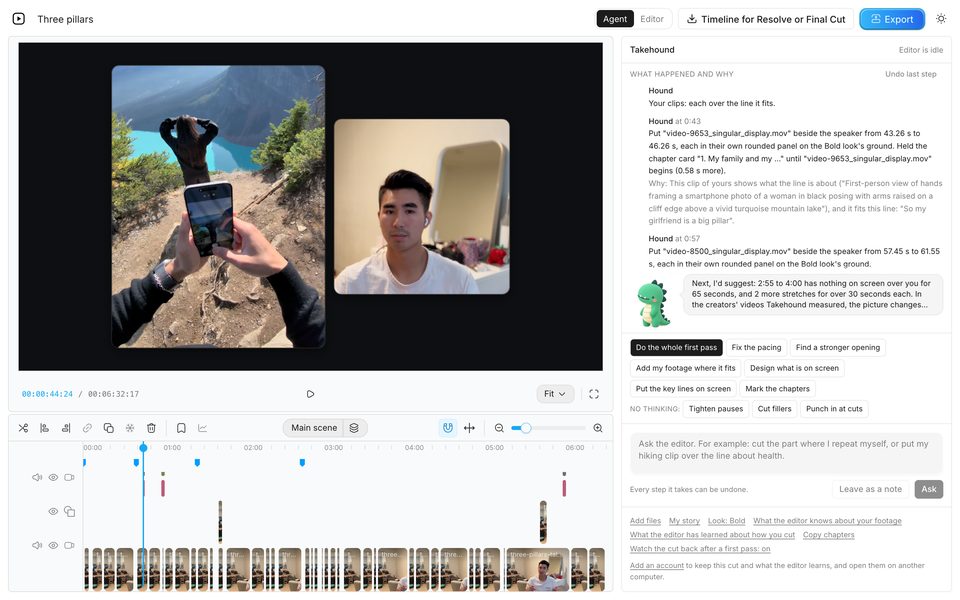
I'm Kyle. I built Takehound, so I have a stake. I did not test Descript for this page. Each fact about it is from Descript's own pages, read 2026-11-05, linked under Sources.
Side by side
Scroll sideways to see every column.
| Topic | Descript | Takehound mine |
|---|---|---|
| Built for | Every kind of video, its home page says, from marketing and sales teams to podcasters. Its pricing page says more than 6 million creators and teams use it. | People who talk to camera in long videos and are not editors: talks, lessons and coaching videos. |
| The talking head | You edit the video by editing its transcript. Its tools remove filler words (English only), shorten gaps between words, remove retakes and turn your eyes to the lens, and Studio Sound cleans the voice. Underlord, its AI co-editor in beta, takes requests in words. | One press cuts long pauses, filler words and repeated takes while you watch. It also takes a room's hum off your voice and grades the picture. |
| B-roll comes from | Stock from GIPHY and Storyblocks, generated clips from models such as Kling and MiniMax, and generated images, or your own media, placed by hand or by asking Underlord. Quick Design covers cuts with stock and generated media. Searching your footage by what is on screen is on Enterprise. | Only your own clips, photos, slides and screen recordings. No stock, nothing generated. Where none of it fits, the line stays on you. |
| Reasons | Words its retake and clarity tools remove stay in the transcript as ignored text you can restore, and Underlord saves a checkpoint you can go back to. A reason for each change: not found on its pages. | A reason in plain words for each change, in a feed. Not proof, so watch each one, and undo what you don't want. |
| Words on screen | Captions and titles, caption translation into more than 60 languages, and dubbing into 28. | Your key lines as titles, lists and tables, and captions over the whole video in one press. Only words you said. |
| You get back | A finished video, or on Creator and up a timeline for Premiere, DaVinci Resolve, Final Cut, Pro Tools, Audition or Reaper. Its titles, effects and transitions do not carry over. | An MP4 from the browser, or a timeline (FCPXML) that opens in DaVinci Resolve. Final Cut has not opened one. Not Premiere. |
| Where it runs | Apps for Mac and Windows, and the full editor in a browser. | Chrome on a laptop or desktop. Nothing to install. Not made for a phone. |
| Price | Free to start. Paid plans from $16 a person a month billed yearly, or $24 monthly. See Prices. | 4,350 free credits once, no card, enough for a first video of up to 30 minutes. Then plans from $50 a month for 6,250 credits. A first pass uses 90 credits a minute of recording; exports are free. |
Not found on its pages“Not found on its pages” means it was not found on 2026-11-05, not that Descript can't do it.
Prices, read 2026-11-05
Descript's plans as its pricing page showed them on 2026-11-05, in dollars, and Takehound's as its own pricing page has them today.
Descript
Scroll sideways to see every column.
| Plan | Billed monthly | Billed yearly, a month | What you get |
|---|---|---|---|
| Free | $0 | $0 | 1 media hour a month, 100 AI credits once, 720p export with a watermark |
| Hobbyist | $24 | $16 | 10 media hours and 400 AI credits a month, 1080p |
| Creator | $35 | $24 | 30 media hours and 800 AI credits a month, 4K, timeline export |
| Business | $65 | $50 | 40 media hours and 1,500 AI credits a month |
| Enterprise | Custom | Custom | Sized to your team |
Descript's prices are per person a month. Its AI tools use AI credits on every plan.
Takehound mine
Scroll sideways to see every column.
| Plan | Price | What you get |
|---|---|---|
| Free | 4,350 free credits once, no card | Every feature, and credits for a first pass and your notes on it |
| Monthly plans | $50, $100 and $250 a month | 6,250 to 37,500 credits a month, 125 to 150 credits for each dollar. Unused credits roll over and stay after you cancel |
| What it uses | A first pass uses 90 credits a minute of recording, so a 15-minute talk with two rounds of notes uses about 1,550 credits. Exports, timelines and editing by hand are free | A job that fails on our side uses nothing |
Where Descript wins
- It records too: remote guests and your screen, in the same app you edit in.
- Podcasts: it transcribes several tracks and tells eight or more speakers apart.
- A timeline for Premiere, and for Pro Tools, Audition and Reaper, on Creator and up. Takehound exports none of those.
- Price per hour: Hobbyist gives 10 media hours a month for $16 billed yearly. Takehound uses credits for each minute of recording.
- Teams: comments and live collaboration on every plan, and a team of 3 on Creator or 5 on Business.
- Stock or a generated clip where your footage has nothing for a line.
Which one to pick
Pick Descript if
- You record, edit and publish in one app, with your screen or remote guests.
- You make podcasts, or edit as a team.
- You want stock or a generated clip where your footage has no fit.
- You finish in Premiere, or want a lower price per hour than Takehound.
Pick Takehound if
- You talk to camera in long videos, and you are not an editor.
- You want B-roll only from your own footage, and a gap where none of it fits.
- You want a reason for each change, and an editor that learns how you cut.
- You finish in the browser or DaVinci Resolve, or hand the timeline to your editor.
Weighing more tools? See six AI video editors for talking-head videos, compared. Other tools place your own clips too: B-roll from your own footage compares nine of them. For a raw talk auto-edited with AI B-roll, see OpusClip against Takehound.
Sources
Descript's home page, pricing page, its help pages on timeline exports, the media panel and stock, Quick Design, Underlord, filler words, retakes and clarity, eye contact, generated media, ignored text, checkpoints, translated captions, dubbing, Descript for web and system requirements, read 2026-11-05.
The tool I built
Where Takehound fits
Takehound is an AI video editor in Chrome on a laptop or desktop, for long talk-to-camera videos.
What Hound does
Its agent is Hound, and on a talk he watches and listens to the cut he makes. One press makes a first pass on your recording: he cuts long pauses, filler words and repeated takes, places your own clips where he matches them to what you say, working from written descriptions of stills from each clip, and puts key lines on screen, with a reason for each change. B-roll is only your own footage, and a line none of it fits stays on you. Steer him in plain words, and he writes down how you cut for your next video. Then export an MP4, or a timeline (FCPXML) that opens in DaVinci Resolve.
4,350 free credits once, no card. See privacy.
See how Takehound worksQuestions
Is Takehound a Descript alternative?
Yes, for one kind of video: a long one where you talk to camera and want B-roll from your own footage. Both cut filler words and pauses. Descript also records, edits podcasts, adds stock or generated clips and exports to Premiere, and Takehound does none of those. (Descript's home page and pricing page, read 2026-11-05.)
Does Descript use my own footage for B-roll?
You can place your own media by hand, or ask Underlord to use it, as with slides for B-roll. Its Quick Design covers cuts with stock and generated media, and searching your footage by what is on screen is on Enterprise. Takehound places your own clips by itself and never uses stock or a generated clip. (Descript's help pages on Quick Design and the media panel, read 2026-11-05.)
Which is cheaper, Descript or Takehound?
Per hour of recording, Descript: Hobbyist is $16 a person a month billed yearly, or $24 monthly, for 10 media hours. Takehound: 4,350 free credits once, no card, enough for a first video of up to 30 minutes, then plans from $50 a month for 6,250 credits. A first pass uses 90 credits a minute of recording, so a 15-minute talk with two rounds of notes uses about 1,550 credits. (Descript's pricing page, read 2026-11-05.)
Can Descript export to DaVinci Resolve or Final Cut?
Yes, on Creator and up: Premiere, DaVinci Resolve, Final Cut and some audio apps. Its titles, effects and transitions do not carry over. Takehound exports an FCPXML timeline that opens in DaVinci Resolve, and not for Premiere. Final Cut has not opened one. (Descript's help page on timeline exports, read 2026-11-05.)
More guides
- AI video editors for talking-head videos, compared
Six tools side by side: where B-roll comes from, reasons, timeline export and price, with dated prices.
- How to add your own B-roll in Descript, in 6 steps
Yes: drag your own clips onto the script as layers, or ask Underlord. Six steps by hand, and where Takehound differs.
- Gling alternative for talking heads with your own B-roll
Gling cuts bad takes and silences for YouTube at a low price. Row by row, with dated prices.