Guide
How much B-roll do you need? Count it from your script
One way to get a number: count the lines of your script that name something you can show, and plan one shot for each. Expect some lines to stay on you.
- Published rules differ: from one usable minute of B-roll per minute of main footage to ten times the finished video. Ten, side by side.
- One real cut: a 50-second talk kept 3 cutaways, 14.5 seconds in all. Its numbers, and how it was made.
- A count sheet to copy.
I'm Kyle. I built a tool for one step below, so I have a stake. I'm not an editor. Other sites' rules are reported from their pages, not tested. The count and the filming tips are suggestions.
Other sites' pages read 2026-10-04, paraphrased and linked.
Published rules
How much B-roll to film: ten published rules
Ten pages that answer the question. The third column is what each number is counted against.
Scroll sideways to see all four columns.
| Page | Its rule, paraphrased | Counted against | Written for |
|---|---|---|---|
| Videomaker read 2026-10-04 | Footage worth four to six times the finished interview. | The interview as it runs in the final cut | Not stated. Its example is an interview with a welder |
| Microsoft Clipchamp read 2026-10-04 | Footage worth four to six times the finished video. Its example is a one-minute interview. | The final video length | Speaks to vloggers and businesses |
| TechSmith read 2026-10-04 | Says the amount varies by project, and offers four to six times as a guide. | The length of the video | Not stated |
| Captions read 2026-10-04 | Four to six times, as a starting point. Separately, a rough 60/40 guide for the finished video: about 40 percent B-roll, which it ties to talking-head and tutorial videos. | Your own estimate of what you need. The 60/40 guide: the finished video | Names content creators and marketers |
| SocialRails read 2026-10-04 | Five to ten times. Its example: 10 to 20 minutes for a two-minute video. | Your own estimate in its summary, the final video length in its FAQ | Not stated |
| ShortGenius read 2026-10-04 | At least two to three times what you plan to use, earlier on the page. At least twice what you think you need, under its own heading on the question. Its example there: about 10 minutes for a three-minute video. | What you plan to use, or your own estimate of what you need | Not stated |
| LTX read 2026-10-04 | For each minute of A-roll, a minute of B-roll you can use. For each finished minute, three to five different shots. Its example: a two-minute video with six to ten clips in the cut and as many again unused. | The A-roll (the main footage), then the finished cut | Speaks of editors and production teams |
| Storyflow read 2026-10-04 | Calls it a first estimate that changes with the format: about one shot that makes the cut per 20 to 30 seconds. It says to film two to three times your list, as more angles of each subject. | The finished video | Has sections on talking head, YouTube and documentary |
| Miura Visual read 2026-10-04 | By length: 5 to 8 usable clips for 15 to 30 seconds, 8 to 12 for a 30 to 60 second Reel or TikTok, 10 to 20 for one to three minutes, 20 to 40 for a three to five minute YouTube video. For an interview, one or two shots per key point. | The length of the video, or each key point of an interview | Not stated |
| Visla read 2026-10-04 | Says no single ratio fits. It asks for enough footage to show every main point, and says the target is not a count of minutes. | Each main point | Speaks of teams |
The rules differ in the number and in what it is counted against. For how much to film or have ready, they run from a usable minute per minute of A-roll (LTX) to ten times the finished video (SocialRails). Four pages give four to six, against three bases: the finished interview, the finished video and your own estimate. Each of the nine pages that gives a number offers it as a guide, a target or an estimate.
Videomaker's words are “four to six times the final interview length” (John Cassinari, Videomaker).
A way to count
Count it from your script
A suggestion, in four steps. It gives a number of shots, not minutes.
- Split the script into lines, one idea each.
- Mark each line that names a place, a thing or an action.
- Write the one shot each marked line asks for.
- Tick the shots already in your camera roll. What is left is your list to film.
The marked lines are your count. Shot ideas: the 20-shot checklist. Finding a clip on your phone: How to organize B-roll on your iPhone.
Real examples
Two examples from this site, counted
Both are published here, and both use footage from one trip. Two short examples, not a rule.
A 50-second talk, 7 lines
- 5 cutaways were proposed, 2 were removed in review and 3 kept.
- 4 of the 7 lines stayed on the speaker.
- The 3 kept ran 5, 4.5 and 5 seconds: 14.5 of the 50 seconds.
- In this cut they start 3.0, 7.8 and 7.5 seconds into their clips, and two end more than 12 seconds in.
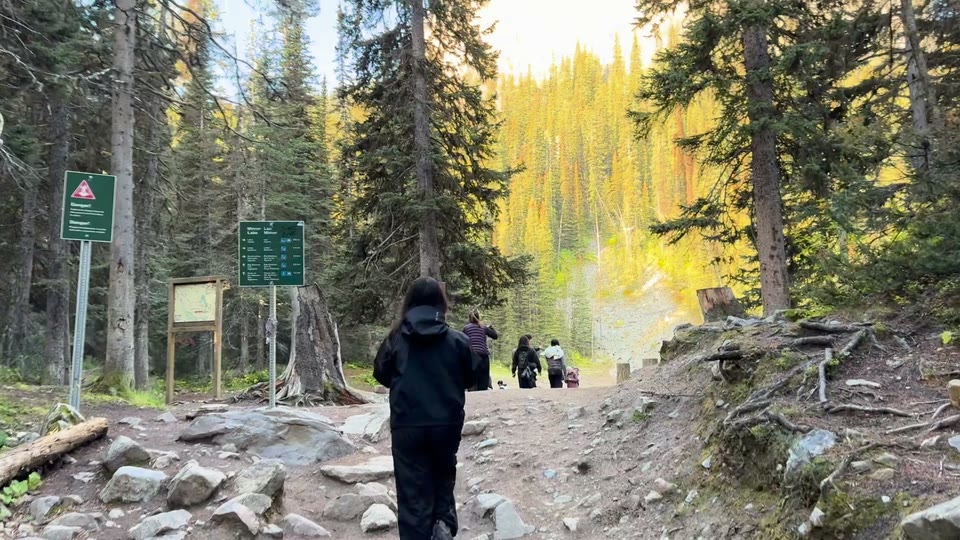
A kept cutaway, 4.5 seconds, on the line
“So choosing three things that matter the most to you and then focusing on that”
The tool's reason
“A hiker pausing at a trail sign suggests stopping to choose what matters most.”
From How to edit a talking head video with B-roll. Cut from a recording with the Mac version of Takehound. Best of three runs. The browser version takes a pasted script instead.
A five-line script about one trip
- 5 lines, 5 shots.
- Timed from the words alone, the five lines came to 18 seconds: an estimate, not a finished video.
- The folder held 135 clips, 119 of them upright. The cut was sideways.
From the retreat recap guide. Made with the Mac version of Takehound from a typed script, with no recording. Across four runs, line 5 was the one line whose clip ever changed. The frames shown there were chosen by hand.
So: 3 of 7 lines in the talk, and 5 of 5 in the trip script, whose lines were written about the trip the footage came from.
The count sheet
A count sheet to copy
One block per script line. Repeat it as needed.
B-roll count sheet
Script lines: __
Lines marked: __
Already filmed: __
To film: __

Line 1:
  shot it asks for:
  [ ] have it   [ ] film it
  [ ] wide   [ ] close
  [ ] held a slow count of ten

Line 2:
  shot it asks for:
  [ ] have it   [ ] film it
  [ ] wide   [ ] close
  [ ] held a slow count of ten
The To film line is what is left to shoot. The wide and close boxes are optional.
Filming
When you film the missing shots
Five suggestions, four beside a fact from this site.
- Hold each shot for a slow count of ten. Two of the talk's three kept cutaways end more than 12 seconds into their clips.
- Turn the phone to match the finished video. On that trip, 119 of 135 clips were upright and the cut was sideways.
- Keep one clear subject in frame. One cutaway removed from the talk was a crowd of strangers. The other never showed the couple it was picked for.
- Film people who have agreed. For clients and attendees, get it in writing.
- A phone is enough. The talk and its cutaways were filmed on an iPhone.
One step
Where Takehound fits
Step 4 is the matching. Takehound is a tool you run in a desktop browser. You choose a folder of your own MP4 or MOV clips and paste a script. For each line it can, it picks one of your shots and gives a one-line reason. It places nothing where no shot fits. It exports a B-roll timeline (FCPXML) for DaVinci Resolve or Final Cut, not Premiere (import steps).
Where it places nothing, stay on camera or film the shot. It does not run on a phone.
Other tools do this step too: AI B-roll from your own footage compares nine.
See how Takehound worksQuestions
How much B-roll do you need per minute of video?
The pages read here differ. LTX matches the A-roll minute for minute with usable B-roll, and gives three to five shots for each finished minute. Storyflow's estimate works out to two to three usable shots a minute. One example: the 50-second talk counted on this page kept 14.5 seconds of cutaways, on 3 of its 7 lines. Pages read 2026-10-04.
How many B-roll clips for a 60-second video?
By arithmetic, Storyflow's estimate gives two to three usable shots. LTX gives three to five shots for each finished minute, and its example keeps as many again unused. Miura Visual's table gives 8 to 12 usable clips for a 30 to 60 second Reel or TikTok. One example: the 50-second talk counted on this page kept 3 cutaways. Pages read 2026-10-04.
How much B-roll for a 10-minute video?
How long should you hold a B-roll shot?
Two different lengths. While filming, at least: ten seconds (Storyflow, SocialRails), 5 to 10 (Miura Visual), or 10 to 15 for short videos (Clipchamp, TechSmith). On screen: 2 to 5 seconds (Storyflow, Captions) or 3 to 7 (SocialRails). In the 50-second talk counted on this page, the three kept cutaways ran 5, 4.5 and 5 seconds. Pages read 2026-10-04.
More guides
- B-roll ideas for coaches: the shots your script asks for
What one real 50-second talk asked for, line by line, and a checklist of 20 shots to film or find in your camera roll.
- How to edit a talking head video with B-roll
When to cut away or stay on the speaker, shown cut by cut on one real 50-second talk.
- Retreat and event recap video: shot list and script
How to plan, film and script a 60 to 120 second retreat or event recap from your own footage.